Zinc Oxide – Who knew it was so fundamentally important? (Funny Video)
This educational science video starts off quite serious but takes an unexpected turn for the hilarious! ;-)

This educational science video starts off quite serious but takes an unexpected turn for the hilarious! ;-)
An artificially intelligent chatbot version of Captain Kirk has a funny conversation with A.L.I.C.E another AI chat bot
2 cool music videos
ArcAttack playing the doctor who theme tune. Electric performance as a guy dressed in a fararday cage suit dances whilst being struck by artificial lightning!
Felix’s Machines, wonderful music all performed by custom made machines
OFCOM have compiled a map of the major 3G mobile company’s network coverage in the UK. The map shows hutchinson (Three), Orange, O2, T-Mobile and Vodafone. From the map, it looks like Three + Orange have the best 3G coverage, and O2s leaves a lot to be desired. The map was compiled in January 2009, so I guess things might have improved at least a bit by now. I personally get terrible coverage on my Three 3G phone where i live in London, with constant line dropping during calls, though maybe im just unlucky. I wonder if it has anything to do with them also giving away free MSN chat + Skype over their network.
Link to map: http://bit.ly/7eZbiu ( pdf 667k )
Reminder: Facebook Purity has taken a lot time and work to develop, if you like the script and would like to thank me for developing it, please donate to show your appreciation and support.
Related Articles:
I decided to write a guide for people who would like to see certain “Extra” story types that currently get hidden by the Facebook Purity Greasemonkey script.
Heres how you can alter your copy of the script to display the stories you want to see.
The section of the code you need to edit is close to the top of the script and is shown below.
// EXTRA STORIES

var JOINED_GROUP_STORY   = 21 ;

var BECAME_FAN_STORY     = 161 ;

var BECAME_FRIENDS_STORY = 8 ;

var ATTEND_EVENT_STORY   = 38 ;

var ATTEND_EVENT_STORY2  =  178 ;

var ATTENDED_EVENT_STORY  = 1 ;
Basically if you want to see a particular “extra” story type, just change the value after the “=” sign to
zero (0).
For example if you want to see all “attending event” stories, just change the following lines of code
var ATTEND_EVENT_STORY   = 38 ;

var ATTEND_EVENT_STORY2  =  178 ;

var ATTENDED_EVENT_STORY  = 1 ;
to
var ATTEND_EVENT_STORY   = 0 ;

var ATTEND_EVENT_STORY2  =  0 ;

var ATTENDED_EVENT_STORY  = 0 ;
if you want to see all “became a friend” stories, change the following line of code
var BECAME_FRIENDS_STORY = 8 ;
to
var BECAME_FRIENDS_STORY = 0 ;
if you want to see all “became a fan” stories, you would change the following line
var BECAME_FAN_STORY = 161 ;
to
var BECAME_FAN_STORY = 0 ;
And its the same for “joined a group” stories.
If you want to hide “commented on status” or “likes status” type messages, find the following bit of code:
var COMMENTED_ON_OR_LIKES_STATUS_STORY = 0 ;
and change it to:
var COMMENTED_ON_OR_LIKES_STATUS_STORY = 11 ;
For info on how to edit the application whitelist, i.e which applications you dont want to be hidden by the script, and also how to set up a text editor for actually editing the script, please see my previous article : Editing the Facebook Purity Whitelist.
Related Articles:

|
What is Facebook Purity?Facebook Purity is a Greasemonkey script that helps you to take control of the News Feeds on your Facebook home page. It does this by filtering out the application spam, such as quizzes etc, and also the messages such as “x became a fan of y”, “x joined group y”, “x became friends with y”, “x is attending event y”. |
At present Facebook Purity is free, but is supported by donations. If the script helps you out and you appreciate and respect the hard work put into the script and would like to thank the developer, you can do so by donating some money to me via the secure PayPal Donate button above.
You can get the script here: http://www.fbpurity.com
You can find out the latest news by becoming a fan of this page. I will keep you updated with news of the latest releases, bug fixes, tips and tricks etc. You might also want to subscribe to my blogs RSS feed, Excellatronic Communications and you can also follow my updates on Twitter too: http://twitter.com/steeev.
If you want the latest news and information about the script beamed to your computer screen directly when its updated, become a fan of Facebook Purity on Facebook here: fans.fbpurity.com
Greasemonkey is an add-on on for the Firefox web browser (and certain other browsers too), that lets you alter the way websites are displayed to you in your browser. The way it works is you download scripts (small sets of custom instructions) for the sites you want to alter, once installed the script changes the page in some useful way, perhaps changing the layout or adding new features to the site, or even removing features you dont like.
Firefox also known as “Mozilla Firefox” is a cool web browser available for all major operating systems, i.e Microsoft Windows, Apple Macintosh, Linux. The cool thing about it is, there are hundreds of useful addons available for it from third party developers that offer extra functionality.
A web browser is the program you use to visit and view websites on the World Wide Web. Its what you are using right now to view this site. There are various web browsers out there for various operating systems.
Facebook Purity is compatible with Mozilla Firefox, Google Chrome, Safari and also Opera
No, see above.
The operating system doesnt really matter, whatever operating systems run the following web browsers: Firefox, Chrome, Opera and Safari will work fine with Facebook Purity
Theres a guide to editing the Facebook Purity whitelist here : http://whitelist.fbpurity.com
Instructions on customising the “Extra” stories that get hidden are here: http://extras.fbpurity.com
Theres a guide to turning off the Facebook suggestions box here : http://www.fbpurity.com/extras.htm#hidesuggestionsbox
The script does not block status updates from Pages. The page in question is probably posting its updates via an application. Look at the bottom of one of the Page’s status updates and see if there is a “via (some application)” link. You will need to add that application to the FBP whitelist in order to stop FBP hiding that Page’s updates.
You can suggest this page to your facebook friends who you think might be interested.
There are some other suggestions of what you can do to help me out here.
Or you can let all your friends know about it, by posting this page to your stream via the Share button. Share on Facebook
You can make general suggestions for the script here: http://www.fbpurity.com/contact/. Please note i may not have time to answer all emails, but will definitely read them.
You can make suggestions for additions to the default application whitelist that is built into the script here: http://whitelist.fbpurity.com
1) Check that greasemonkey is enabled (in firefox, you can look for the brown monkey icon in the bottom right of your screen, if its grey it means greasemonkey is disabled, click it once to re-enable it) Another way to check is to see if other scripts you have installed are working.
2) Check that the problem is not caused by other scripts running on the same page. You can do this by temporarily disabling the other GM scripts (in firefox you can do this via the Tools/Greasemonkey/Manage Userscripts menu) and see if that fixes the problem 3) Check that you have the latest version of the script installed. Visit http://www.fbpurity.com and check the date of the latest release. If it is more recent than the version you have installed, update it. 4) Check if the layout of the site has changed, if the site looks different or has new features, it probably means Facebook have changed the underlying code of the site, which means the FB Purity script will need to be updated to work with the new code. Check my blog, or the FBP fan page for news of a a new version of the script. 5) Try re-installing the script, perhaps the script has become corrupted or you’ve edited it and introduced an error. 6) If none of the above work, you can file a bug report with as much info as possible via my contact form Important information you should include : What Operating System you are using, What Browser and what browser version number. Script version number. What exactly is the bug. What steps did you take that lead up to the appearance of the bug, what exactly do you see on the screen, a screenshot can also be helpful. If using Firefox open the “Tools/Error Console” then click the round red button with the white cross inside it, marked “Errors” and copy and paste any errors you see into your report.Its me, Steve! :) You can contact me here: http://www.fbpurity.com/contact/ Please note i may not have time to answer all emails, but will definitely read them.
I just released v2.2a of the facebook purity greasemonkey script for firefox, google chrome, opera, and safari.
In this release: I rewrote the filter system. I also updated the “App” filter so it now treats “photos” that have been posted to the feed by an application as application spam and hides them via the “App” filter. This means it should block Farmville “photos”, “our good friends” “photos” etc
You can get the latest version of the script here: http://www.fbpurity.com
I noticed a bug in Facebook today, a lot of text on the home/live stream is being made bold, when it shouldnt be. This was affecting the script, and means the script was not working 100% correctly. This release fixes that issue.
Also new in this release, ive added the Facebook for Android application to the default whitelist.
Ive also added an option in the script to turn off the suggestions box. The suggestions it makes, can sometimes be annoying, if you want to turn off the suggestions box, locate the following text in your copy of the script.
var suggestionsbox=1;
and change it to
var suggestionsbox=0; this will hide the suggestions box.
For info on how to edit a gm script, see my previous post about editing the whitelist : http://whitelist.fbpurity.com
You can get the updated version 2.1b of the script as usual from here: http://www.fbpurity.com

some great photos by Jurgen Otto of the Peacock Spider
never seen or heard of it before, but somehow it reminds me of George Clinton
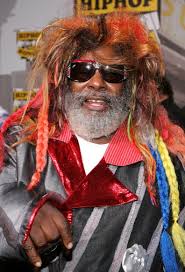
i wonder who copied who, lol
